

Tokenize data
This guide explains how to tokenize and detokenize your data with a Skyflow vault.
Concepts
When you tokenize data, you insert a value into a table and get a token that represents the value in return.
When you detokenize data, you submit a token and receive the value in return.
Each column in your vault can have a token format that determines how the column generates tokens for its values:
- UUID deterministic token: This format generates random UUIDs. If a value appears in the column more than once, each instance of the value generates the same token.
- Format preserving deterministic token: This format generates random tokens but preserves the format based on the specified regular expression (regex) expression. If a value appears in the column more than once, each instance of the value generates the same token.
- Format preserving token: This format generates random tokens but preserves the format based on the specified regex expression. Tokens have no connection to the column value.
- UUID token: This format generates random UUIDs. Tokens have no connection to the column value.
- Transient UUID token: This format generates random UUIDs. Tokens have no connection to the column value. This format purges data after a predefined time to live (TTL) expires. If the token expires, detokenization fails. When you update a transient field with a new value, the TTL resets.
- Preserve email domain deterministic token: This format preserves the domain and top level domain (TLD) of an email address. For example, “jane@example.com” might become “yrnakewnmfpanwnfszaejd@email.com”. If a value appears in the column more than once, each instance of the value generates the same token. Only works with columns formatted as the Email data type.
Each column can belong to a column group, which lets columns in the group generate the same deterministic tokens for the same values, regardless which tables the columns belong to. This lets you track common values across tables without exposing yourself to sensitive data.
Prerequisites
Studio
API
-
Sign in to your Skyflow account. If you don’t have an account, sign up for a free trial.
Configure tokenization in your vault
The credit_cards table in the Quickstart vault has four columns configured for tokenization:
- cardholder_name, expiry_month, and expiry_year generate UUID deterministic tokens.
- card_number generates format preserving deterministic tokens.
The persons table has with five columns configured for tokenization:
- name, date_of_birth, and state generate UUID deterministic tokens.
- email_address and ssn generate format preserving deterministic tokens.
Studio
API
You can only set column groups via the Management API.
To set the token format for a column,
- Navigate into your vault.
- Click Edit schema.
- Click the arrow in header of the column you want to tokenize, then click Edit column.
- Click Continue.
- In the Tokens section, select the applicable tokenization option for the column.
- Click Continue through the remaining sections, then click Save column.
- Repeat these steps for each column you want to tokenize. After you update all the columns you want to tokenize data for, click Publish.
Tokenize your data
After you configure your vault, it automatically generates tokens based on your tokenization settings. Use the following API calls to insert new records and retrieve existing tokens.
Insert and tokenize your data
Insert a new record and return the skyflow_id and tokens for your data.
Postman
curl
-
Expand the QuickstartVault directory to the credit cards CRUD APIs folder. Choose the Post insert credit_cards method.
-
In the Body, enter values for the parameters. Set tokenization to “true.”
-
Click Send to make the call. Skyflow returns a
skyflow_idand tokens for the record you just inserted.
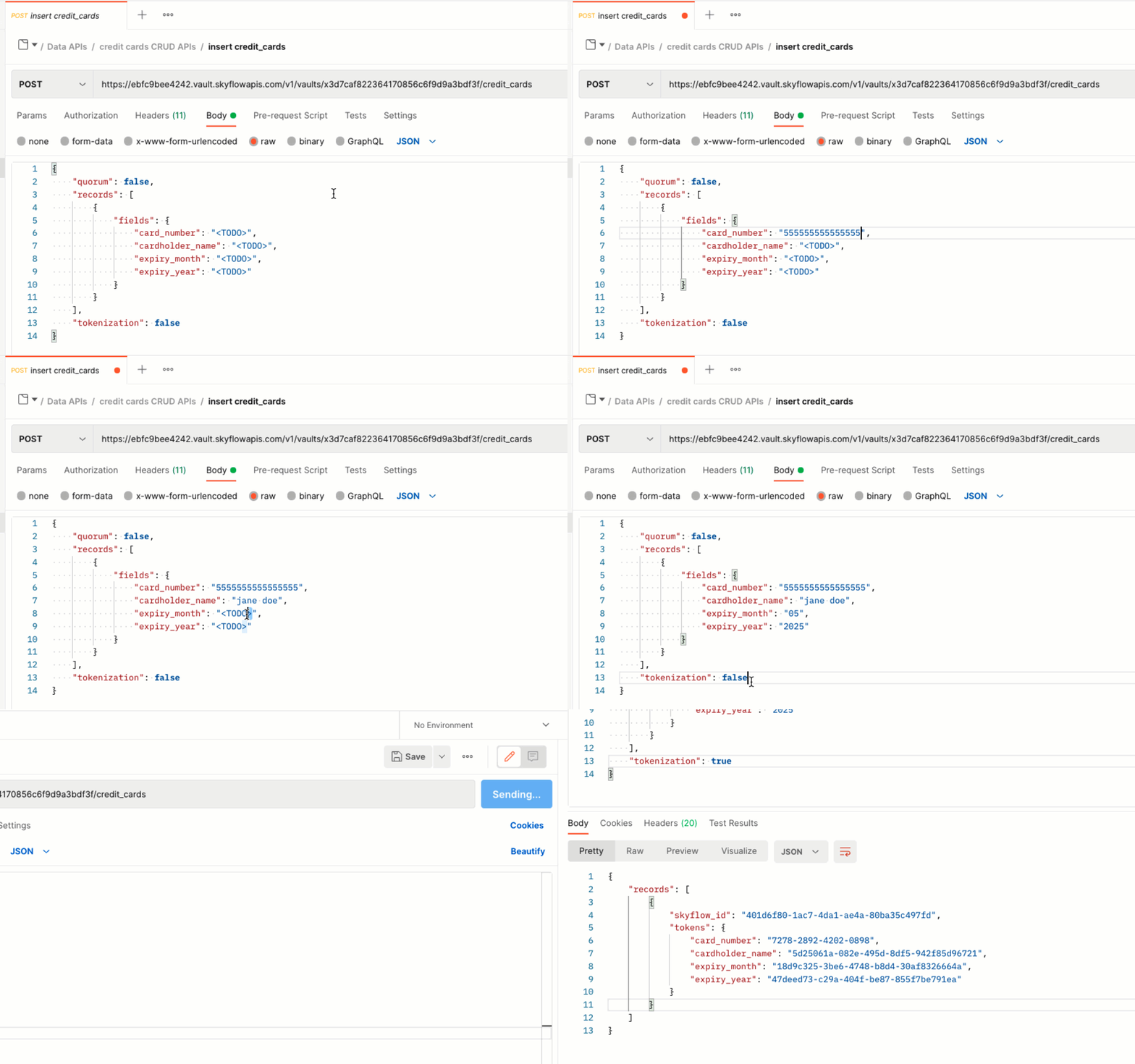
The card_number maintains the standard 16-digit format because of format-preserving deterministic tokenization.
Leave this tab open for quick access to the skyflow_id. In the next section,
you’ll use the ID to retrieve your tokenized data.
Get tokens for your stored data
Retrieve tokens for data already in the vault with the Get Record API.
Postman
curl
-
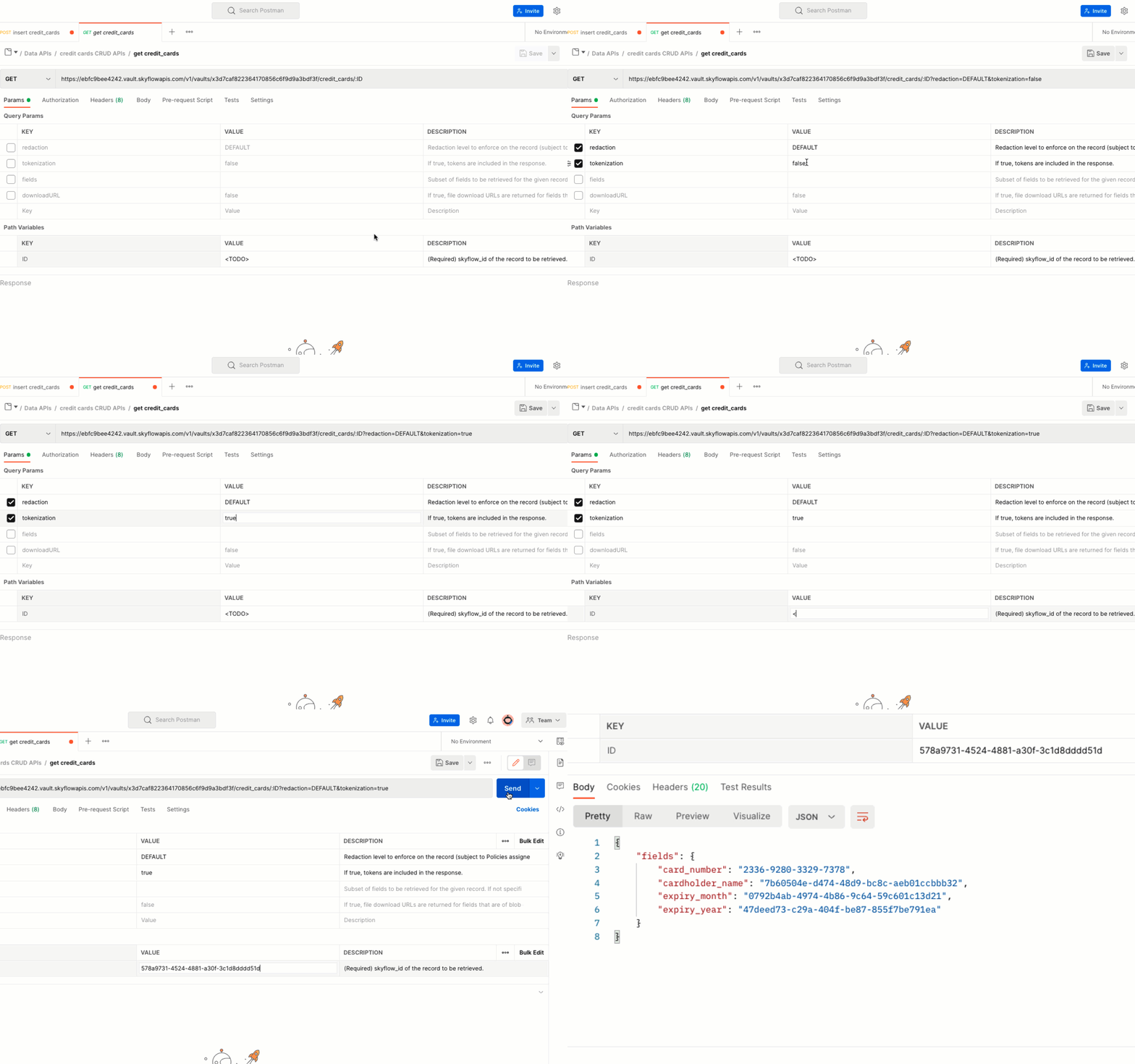
Expand the QuickstartVault directory to the credit cards CRUD APIs folder. Choose the GET get credit_cards method.
-
From the Params section, select the checkboxes for the redaction and tokenization rows to enable them. Change the tokenization value to “true.”
-
Copy and paste the
skyflow_idvalue into the Path Variables Value cell. -
Click Send to make the call. Skyflow returns tokens for the record you specified.
Next steps
You’ve tokenized your data, retrieved your token data, and detokenized your data.
For more detailed information about reading and writing sensitive data to your vault, see the Data API docs.
Read more about custom vault configurations, policy-based access control, or connecting your data to other first-party and third-party services at the pages below: